
What Does a UI/UX Designer Do?
In today’s digital world, every app, website, and software platform competes for attention. Users expect smooth navigation, attractive visuals, and effortless functionality. This is where a UI/UX designer plays a crucial role.
But what does a UI/UX designer actually do? Are UI and UX the same thing? Why are businesses investing so heavily in user experience design?
In this guide, we’ll break down the role of a UI/UX designer in simple terms, explain their responsibilities, and show why they are essential to modern digital products.
Understanding UI vs. UX Design
It is important to note that UI/UX is a role that requires the design of a user interface (UI) and user experience (UX) before delving into the role of a UI/UX designer.
What Is User Experience (UX) Design?
The UX design is concerned with the feeling and functionality of a product. It also makes sure that users do not get frustrated when trying to meet their goals.
A UX designer provides answers to such questions as:
- Is this app easy to navigate?
- Do the users find what they need fast?
- Are checkout procedures easy and convenient?
- Will the product address the problem of the user?
The UX design deals with research, usability, logic, and structure.
What Is User Interface (UI) Design?
UI design is concerned with the aesthetic and interactive aspect of a product. It makes it look and work aesthetically.
A UI designer works on:
- Buttons
- Icons
- Typography
- Color schemes
- Layout
- Spacing
- Interactive elements
UI design is concerned with looks, branding, and visual communication.
How UI and UX Work Together
UI and UX are different but closely connected. UX ensures the product works well. UI ensures it looks good and feels engaging. A UI/UX designer often handles both roles, especially in startups or smaller companies.
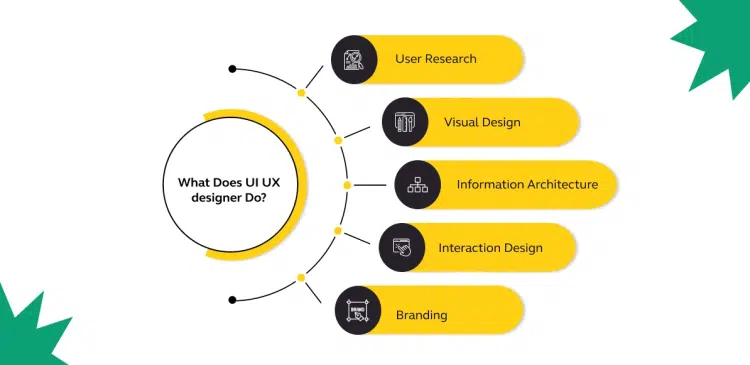
Core Responsibilities of a UI/UX Designer
A UI/UX designer does not just make things look pretty. Their work involves creativity, psychology, business strategy and technical knowledge.

Conducting User Research
Each successful design begins with the knowledge of the user.
UI/UX designers conduct research to learn:
- Who the users are
- What problems they face
- Their expectations of the product
- How they behave online
Ordinary methods of research are:
- User interviews
- Surveys
- Competitor analysis
- Usability testing
- Reviewing analytics
For example, companies like Apple invest heavily in user research to ensure their products feel intuitive and simple.
Without research, design decisions are just guesses.
Creating User Personas
User personas are developed by designers after the collection of research data.
A user persona is a fictional character that represents a target user group.
It includes:
- Age
- Job
- Goals
- Frustrations
- Behaviors
The personas assist designers to remain on track of the actual user requirements rather than the tastes.
Designing User Journeys
A user journey is a process in which an individual follows to accomplish a task.
For example:
- Visiting a website
- Searching for a product
- Adding it to the cart
- Completing checkout
This journey is facilitated by a UI/UX designer in a manner that is smooth and logical and efficient.
If users struggle at any step, they may leave. Companies like Amazon have mastered user journeys by making purchasing extremely fast and simple.
Creating Wireframes and Prototypes
Wireframes are plain layouts depicting structure without details in design.
They focus on:
- Placement of content
- Navigation structure
- Page hierarchy
The prototypes are models that replicate the way the product works in an interactive manner. They give the stakeholders and the users the opportunity to try the experience prior to its development.
The step conserves time, money and resources since issues are detected beforehand.
Designing Visual Interfaces
After approval of the structure, the process of designing the UI starts.
UI/UX designers choose:
- Color palettes
- Typography styles
- Button designs
- Icon sets
- Layout grids
They guarantee uniformity in all the screens and brand loyalty.
For example, platforms like Airbnb are known for clean, modern, and user-friendly interfaces.
An interface that is good develops trust and enhances user satisfaction.
Conducting Usability Testing
Without testing design is never complete.
In usability testing, actual users are exposed to the product as the designers observe:
- Where users get confused
- What slows them down
- Which features they ignore
- What they enjoy
Based on feedback, designers make improvements.
This iterative process ensures the final product truly meets user needs.
Skills Required to Become a UI/UX Designer
An effective UI/UX designer is a person who has a set of technical, creative, and analytical skills.
Design Skills
- Visual design principles
- Typography and color theory
- Layout and spacing
- Branding consistency.
Technical Skills
- Wireframing tools
- Prototyping software
- Simple knowledge of HTML and CSS
- Responsive design knowledge.
Soft Skills
- Empathy
- Communication
- Problem-solving
UI/UX designers collaborate with product managers, marketing teams and developers. Effective communication is needed.
The Business Value of UI/UX Design
Good design has been directly seen to affect the revenue in many businesses.
Improved Customer Satisfaction
Users who like using a product will also spend more time and repeat.
Higher Conversion Rates
Minimal navigation and calls to action boost sales and subscriptions.
Reduced Development Costs
Prototyping and testing avoid costly post-launch repairs.
Competitive Advantage
User experience may be the determining factor in crowded markets.
For example, streaming services like Netflix focus heavily on user interface simplicity to keep viewers engaged.
UI/UX Designer vs. Other Design Roles
People often confuse UI/UX designers with graphic designers or web designers.
Here’s the difference:
- Graphic designers focus on visuals for marketing materials.
- Web designers focus on designing websites.
- UI/UX designers focus on user behavior, usability, and interaction across digital products.
UI/UX design is more strategic and research-driven compared to traditional design roles.
Tools Used by UI/UX Designers
Modern UI/UX designers use professional tools to streamline their workflow, including:
- Wireframing software
- Prototyping platforms
- Collaboration tools
- User testing platforms
Popular design tools include Figma, Sketch, and Adobe XD. These tools allow designers to create interactive prototypes and collaborate with teams efficiently.
Why UI/UX Design Matters More Than Ever
As digital competition increases, users have more choices than ever before. If a website is confusing or slow, users will leave immediately.
A well-designed user experience:
- Builds trust
- Enhances brand reputation
- Increases engagement
- Drives revenue growth
Companies that invest in UI/UX design often see measurable improvements in customer loyalty and business performance.
 Bill Yeager, Co-Owner of High Point SEO & Marketing in CT


